

Educational games designed for nonverbal children are not just simplified versions of mainstream apps. They are purpose-built tools that rely on visuals, sound, touch, and reward systems rather than spoken or written instructions. Finding the right accessible activities can significantly boost a child’s communication development, attention span, and daily confidence. This guide covers what features to look for, the best free options available, and practical strategies for using them effectively at home or in the classroom.
What “Nonverbal” Really Means for Play and Learning
The term nonverbal encompasses a wide spectrum of communication styles. While some children do not use speech at all, others might communicate through occasional single words, vocalizations, or echolalia. Many rely on AAC (augmentative and alternative communication) devices, picture exchange boards, or sign language. The unifying factor is that traditional spoken language is not their primary or most reliable channel for absorbing new information.
Picture-based communication cards that pair perfectly with visual learning games to support nonverbal children throughout the day.
ⓘ Affiliate link — we may earn a small commission at no extra cost to you.
Table of Contents
- What “Nonverbal” Really Means for Play and Learning
- What Makes Learning Games Nonverbal Children Can Truly Benefit From
- Core accessibility features to look for
- Learning areas that work well without verbal output
- Free Learning Games Nonverbal Children Can Access Right Now
- BrightMinds Quiz
- Pictello and similar story-building tools
- BBC Own It and BBC Bitesize Early Years
- Starfall
- Khan Academy Kids
- How to Use Learning Games Nonverbal Children Are Playing More Effectively
- Use a “least to most” prompting approach
- Pair the game with an AAC system
- Keep sessions short
- Track progress simply
- Learning Games Nonverbal Children Need at Different Ages and Stages
- A Practical Starting Plan for Parents and Teachers
- Sources and Further Reading
A common misconception is that children who do not speak cannot understand what is being said. In reality, receptive language often far exceeds expressive language, particularly in children with autism, cerebral palsy, or childhood apraxia of speech. A child who cannot verbalize the word “red” may still understand the concept perfectly and confidently select a red object.
This distinction is crucial for educational game design. The most effective digital activities for these learners prioritize visual input and allow for tactile responses, such as tapping or pointing, rather than requiring speech. Additionally, these tools must provide clear, non-verbal feedback—like celebratory animations, sound effects, or a simple visual checkmark—when an answer is correct.
What Makes Learning Games Nonverbal Children Can Truly Benefit From
Not every app labeled as “educational” is genuinely accessible. Many mainstream options assume a baseline of literacy, the ability to process verbal instructions, or fine motor precision that some learners are still developing. Before downloading a new tool, verify that it includes these core accommodations:
- Picture-based navigation: Menus driven by intuitive images rather than text labels.
- No reading required: Instructions delivered through audio cues, universal icons, or visual demonstrations.
- Large tap targets: Buttons and draggable elements sized appropriately for children with limited motor control.
- Adjustable pacing: The ability to slow down transitions and animations to allow for adequate processing time.
- Consistent reward feedback: Predictable, celebratory sounds or animations that clearly define success.
- Minimal visual clutter: Clean interfaces without distracting backgrounds, which is crucial for children with sensory sensitivities.
- Switch access or scanning modes: Vital compatibility features for children with significant physical or motor difficulties.
Learning areas that work well without verbal output
Certain educational subjects translate naturally into visual and tactile formats. Activities focused on matching, sorting, sequencing, and cause-and-effect require absolutely no spoken response. Not only do these exercises form the foundation of early academic skills, but they also foster the cognitive flexibility necessary for broader communication. Cause-and-effect games are particularly valuable for early-stage learners.
Discovering that pressing a button consistently yields the same visual or auditory result teaches intentionality—the understanding that their actions have a predictable impact on their environment. This realization is a vital stepping stone toward intentional communication.
Free Learning Games Nonverbal Children Can Access Right Now
The following tools are either entirely free or have a genuinely useful free tier. They have been chosen because they meet several of the accessibility criteria above and are available in the UK, US, Australia and Canada.
BrightMinds Quiz
BrightMinds Quiz provides free educational quiz games explicitly designed for children aged 3 to 14 with autism, ADHD, dyslexia, and Down Syndrome. The image-based format allows users to answer by tapping pictures rather than typing or speaking. Categories cover colors, shapes, animals, numbers, and everyday objects—topics highly relevant to early communication frameworks like PECS. Additionally, removing the login requirement eliminates a significant barrier for busy caregivers and educators.
Pictello and similar story-building tools
While Pictello is a paid app, its core concept—visual stories paired with recorded audio—can be easily replicated using free tools like Book Creator’s basic plan or offline Google Slides. Creating a visual story about a child’s daily routine and converting it into a simple quiz (e.g., “What comes after breakfast?”) transforms familiar concepts into an engaging, single-tap activity.
BBC Own It and BBC Bitesize Early Years
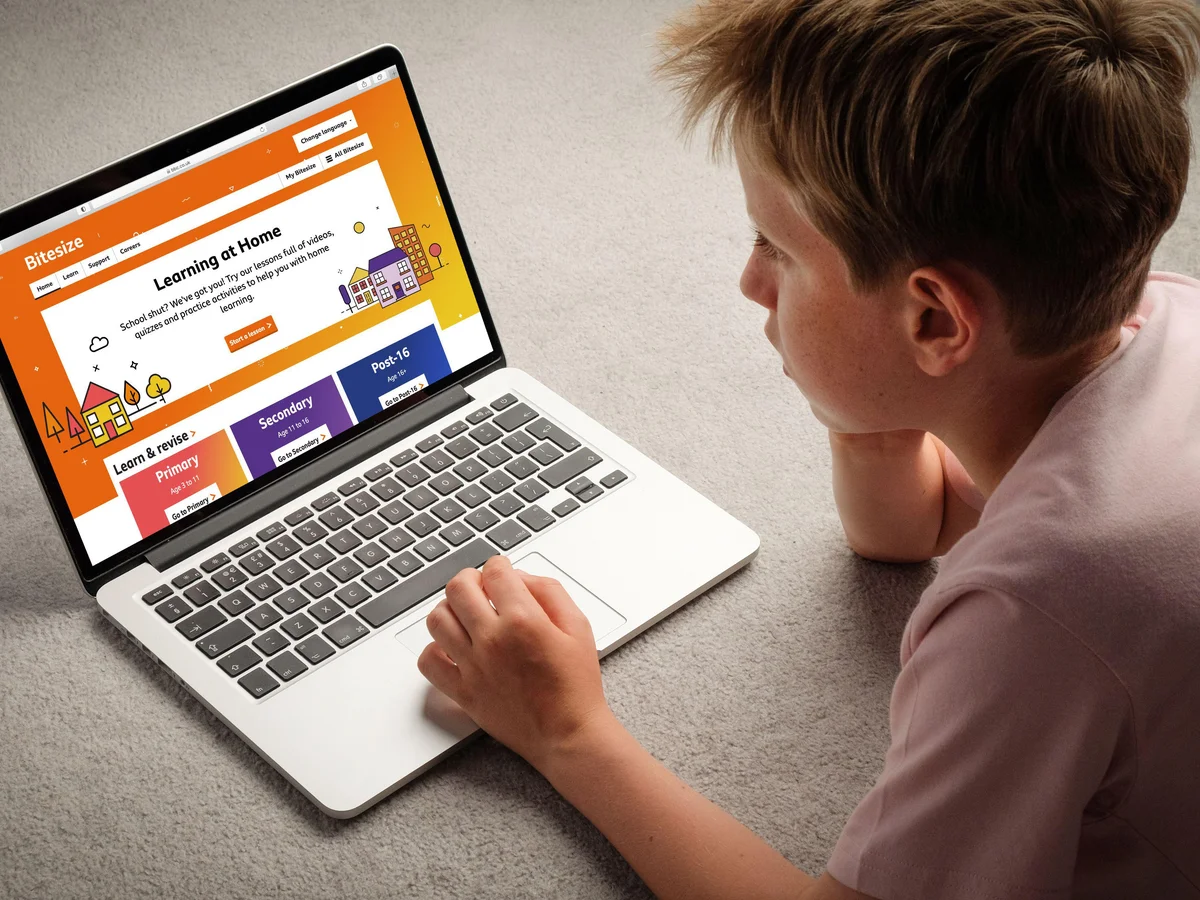
BBC Bitesize Early Years offers free games covering phonics, numbers, and shapes for ages 3 to 7. Many of these activities rely on matching and sorting mechanics that bypass the need for reading or verbal input. The BBC’s strict accessibility standards ensure regular checks for screen reader compatibility and adequate contrast ratios, making these resources excellent for learners working near their age-expected curriculum.
Starfall
This platform offers early math and phonics games that use animation and audio in place of text instructions. Children can tap letters to repeatedly hear their corresponding sounds without any pressure to speak, providing the patient repetition often required in speech therapy programs.
Khan Academy Kids
A completely free app covering early literacy, math, and motor skills for ages 2 to 8. Its tracing, sorting, and picture-matching mechanics work seamlessly without verbal input. Furthermore, characters provide encouragement through music and animation rather than relying solely on voice-based praise, which is ideal for children who find audio-only feedback overwhelming.
How to Use Learning Games Nonverbal Children Are Playing More Effectively
Downloading an app is only the first step; how an adult facilitates the session determines the educational value.
Monitor progress simply: A basic tally of independent, correct responses per session is enough data to determine if an activity is too hard, too easy, or just right.
Implement “least-to-most” prompting: Allow the child to explore independently for a few minutes. If they struggle, offer a gesture prompt (pointing) before moving to a physical hand-over-hand prompt. This preserves agency and reduces prompt dependency.
Incorporate AAC systems: Keep picture boards or speech-generating devices nearby. When the child taps a correct image, immediately model that word on the AAC device to link visual matching with functional communication.
Prioritize short sessions: Research indicates that brief, frequent practice (e.g., ten minutes, twice a day) is highly effective for children with ADHD or autism. Visual timers can help ease transitions.
Effective Strategies for Gameplay
What works for a three-year-old with limited intentional movement is different from what works for a twelve-year-old with strong receptive language but no functional speech. Matching games to developmental stage rather than chronological age is essential.
- Cause and effect (developmental age 12 to 24 months): Any game where pressing a button or tapping the screen produces a clear, repeatable result. The goal is teaching intentional action, not academic content.
- Matching and sorting (developmental age 2 to 4 years): Matching identical pictures, then matching categories (animals, food, vehicles). BrightMinds Quiz and Khan Academy Kids both cover this range well.
- Sequencing (developmental age 4 to 6 years): What happens first, next and last in a familiar routine. Visual schedule apps and story-sequencing games fit here.
- Early literacy and numeracy (developmental age 5 to 8 years): Letter-sound matching, number recognition, simple addition using pictures. Starfall and BBC Bitesize Early Years are appropriate here.
- Functional life skills (any age from 7 upwards): Games covering money, time, safety signs and community vocabulary. These are harder to find for free, but BrightMinds Quiz categories and Google Slides-based custom quizzes can be adapted.
Matching Activities to Developmental Stages
Aligning activities with a child’s developmental stage, rather than their chronological age, is critical for success.
- Cause and effect (12–24 months developmental age): Activities where tapping the screen produces a reliable result, focusing on teaching intentional action rather than academics.
- Matching and sorting (2–4 years developmental age): Pairing identical pictures or organizing items by categories (e.g., animals, food).
- Sequencing (4–6 years developmental age): Understanding what happens first, next, and last in familiar routines using visual schedules or story apps.
- Early literacy and numeracy (5–8 years developmental age): Letter-sound matching and number recognition utilizing audio cues rather than text.
- Functional life skills (7+ years developmental age): Navigating essential concepts like time, money, and community safety signs.
A Practical Two-Week Implementation Plan
For caregivers and educators introducing these tools for the first time, a structured two-week approach prevents overwhelm.
- Week One (Observation): Select a single free tool matched to the child’s developmental stage. Facilitate ten-minute daily sessions without prompting answers. Observe, provide warm praise for engagement, and record independent successes to gauge the difficulty level.
- Week Two (Integration): Introduce AAC pairing. Model the corresponding symbol on their communication device for every correct in-game selection. Monitor for early signs of spontaneous communication, such as the child independently looking at their AAC device. At the end of the trial, share these informal observations with their specialist teacher or speech and language therapist.
Visit our Learning Resources section for more resources on Quiz.
Sources and Further Reading
- National Autistic Society — The UK’s leading autism charity publishes guidance on communication approaches including AAC, visual supports and technology use for autistic children.
- Centers for Disease Control and Prevention — Autism Spectrum Disorder — The CDC’s autism section includes evidence-based information on developmental milestones, early intervention and communication strategies relevant to nonverbal learners.